
Google Fit is a versatile health-tracking platform by Google, designed to simplify how users monitor their health and fitness data. Launched in 2014 and available across Android, Wear OS, and iOS, it integrates with various devices and apps to provide a unified view of your activity and health metrics. Despite its initial simplicity and limited functionality, Google Fit has grown, offering automatic tracking of activities like walking, running, and cycling, while promising further enhancements through third-party app integrations. Its straightforward approach and compatibility with numerous devices make it a convenient choice for users seeking to consolidate their health data in one accessible location.

Google Fit
In the landscape of health and fitness apps, Google Fit emerges as a straightforward yet powerful tool designed to make fitness tracking accessible to everyone. Launched by Google in October 2014, Google Fit aims to provide a cohesive platform that integrates data from multiple devices and apps into one seamless experience. Compatible across Android, Wear OS, and iOS, and available in 34 languages, Google Fit has set out to democratize fitness tracking across the globe.
What is Google Fit?
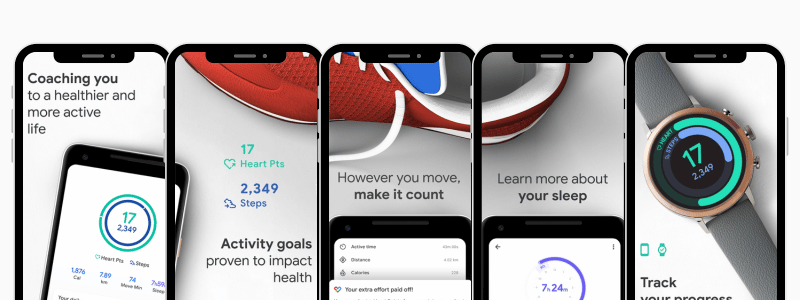
Google Fit is a health-tracking platform developed by Google, functioning across Android, Wear OS, and iOS systems. It offers a unified set of APIs that amalgamate data from various apps and devices, presenting it in an organized and easy-to-understand format. Unlike its competitors, which may offer a plethora of features, Google Fit focuses on core functionalities, emphasizing simplicity and effectiveness.
How Google Fit Works
At its core, Google Fit utilizes the sensors in your smartphone or wearable device to automatically track activities such as walking, running, and bicycling. It’s designed to operate with minimal input from the user, automatically sensing and recording various types of physical activity. Moreover, Google Fit allows for integration with third-party apps, enhancing its tracking capabilities to include a wider range of health metrics.
App Features
Simplified Tracking
Google Fit’s main allure lies in its simplicity. The app automatically detects and records your physical activities, counting steps, calculating calories burned, and monitoring the distance covered. It’s engineered to work silently in the background, collecting data without requiring constant interaction.
Integration with Third-Party Apps
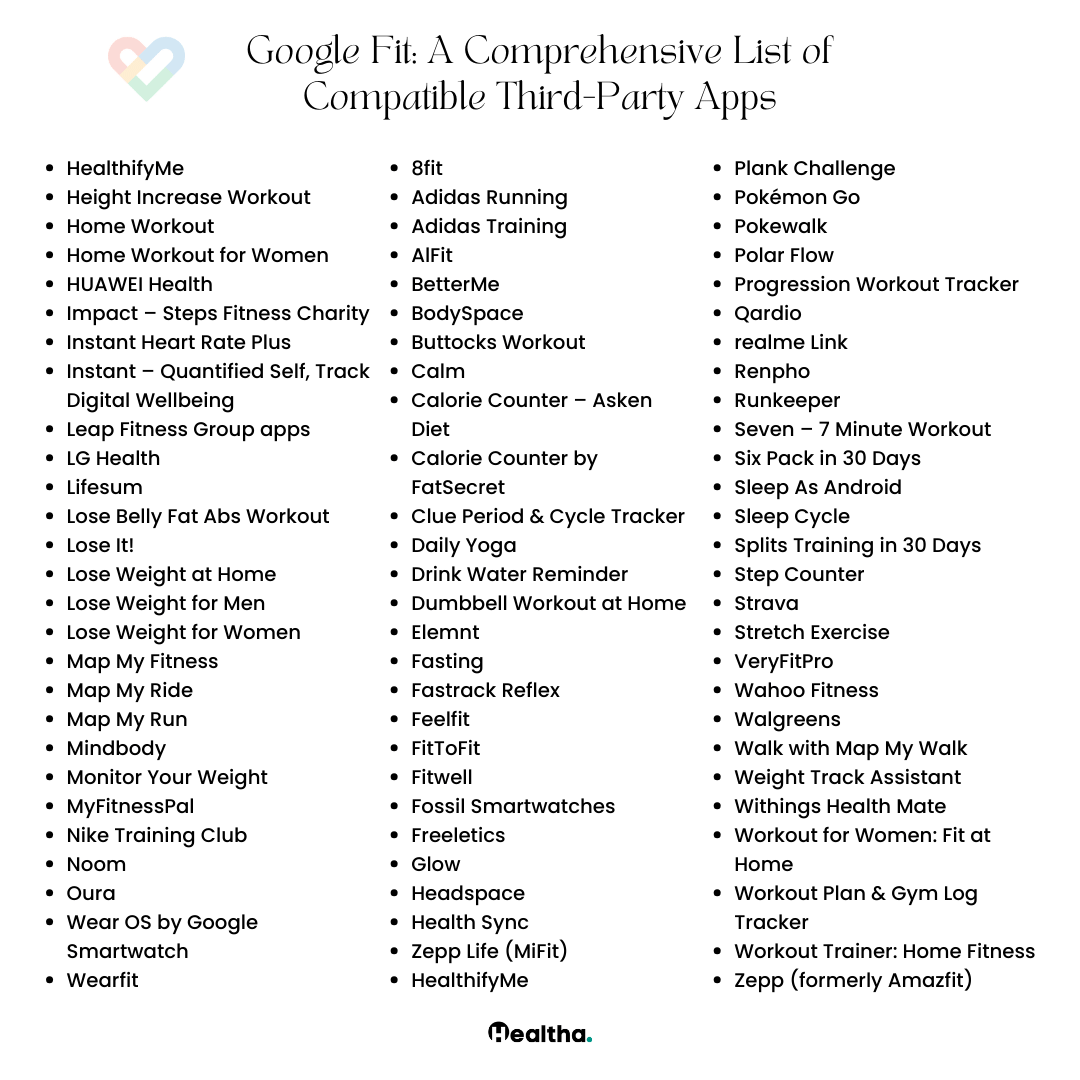
Although Google Fit might seem basic in its standalone form, its true power is unlocked through integration with third-party apps. This feature allows Google Fit to serve as a central hub for all your fitness data, whether it’s sleep tracking from a Nest Hub, workout data from a Wear OS watch, or exercise details from a Polar watch.
Move Minutes and Heart Points
In collaboration with the American Heart Association, Google Fit introduced Move Minutes and Heart Points to translate physical activities into easy-to-understand metrics. Move Minutes track the total time you’re active, while Heart Points are earned through more intense activities. These metrics aim to simplify understanding your fitness efforts’ impact on your health.
Why You Should Use Google Fit
Google Fit is ideal for users seeking a straightforward, no-frills app that covers the essentials of fitness tracking. Its integration capabilities make it a versatile choice for consolidating data from various sources. Plus, its focus on Move Minutes and Heart Points offers a unique approach to measuring physical activity’s health benefits.
Some Cautions, Tips, and Interesting Facts
- Data Accuracy: For optimal tracking, ensure your devices are correctly calibrated.
- Privacy Considerations: Google Fit requires location data to track your activities, which might raise privacy concerns for some users.
- Take Advantage of Integrations: To get the most out of Google Fit, link it with other health and fitness apps you use.
- Interesting Fact: Google Fit’s collaboration with the American Heart Association underscores its commitment to promoting heart health through physical activity.
Complete Details About Google Fit
Health Categories Covered
- Activity Tracking: Automatically monitors walking, running, and biking.
- Integration: Consolidates data from multiple apps and devices for a comprehensive health overview.
- Custom Metrics: Tracks steps, calories, distance, and offers unique metrics like Move Minutes and Heart Points.
Platform and Devices
- Platforms: Android, Wear OS, iOS
- Devices: Compatible with a wide range of smartphones and wearable devices, including all Wear OS smartwatches.
Target Audience
Google Fit is tailored for individuals looking for an easy-to-use app that simplifies health tracking. It’s particularly suited for those new to fitness tracking or users seeking a central repository for data from various health apps and devices.
Conclusion
Google Fit stands out as a testament to Google’s commitment to making fitness tracking as accessible and straightforward as possible. While it may not boast the extensive features of some of its competitors, its strength lies in its simplicity, ease of use, and the ability to integrate with a wide array of third-party apps and devices. Whether you’re a fitness enthusiast or just beginning your health journey, Google Fit offers a solid foundation for tracking your progress and working towards your health goals.
Popular Health Apps
Google Fit Alternative Apps

Balance: Meditation & Sleep
Balance: Meditation & Sleep is a comprehensive app offering guided meditations, sleep stories, and relaxation techniques to support users in...
Withings Health Mate
Withings Health Mate is a top-tier health and wellness app offering seamless integration with Withings devices, comprehensive health tracking features,...

Aaptiv: Fitness for Everyone
Aaptiv: Fitness for Everyone is a versatile fitness app offering audio-guided workouts led by certified trainers. With its user-friendly interface,...
ZRX: Zombies Run + Marvel Move
ZRX: Zombies Run + Marvel Move offers a unique and thrilling fitness experience by combining the immersive storytelling of Zombies...

Running Heroes
Running Heroes is a dynamic fitness app that gamifies exercise, offers rewards, and fosters community engagement. With its seamless integration,...

Calorie Counter by Lose It!
Calorie Counter by Lose It is a top-rated app designed to help users track their calorie intake and achieve their...

Abs Workout – Daily Fitness
"Abs Workout - Daily Fitness" is a comprehensive app designed to help users strengthen and tone their abdominal muscles conveniently...
Home Workout – No Equipment
Home Workout - No Equipment offers convenient, effective workouts that require no equipment. With customizable routines, progress tracking, and daily...
Nike Run Club – Running Coach
Nike Run Club - Running Coach is more than just a running app; it's a community of runners united by...
Daily Workouts – Fitness Coach
Daily Burn offers a comprehensive platform for at-home workouts, catering to various fitness levels and preferences. With a diverse range...
Related Health & Fitness Apps
Balance: Meditation & Sleep
Balance: Meditation & Sleep is a comprehensive app offering guided meditations, sleep stories, and relaxation techniques to support users in...
Withings Health Mate
Withings Health Mate is a top-tier health and wellness app offering seamless integration with Withings devices, comprehensive health tracking features,...
Aaptiv: Fitness for Everyone
Aaptiv: Fitness for Everyone is a versatile fitness app offering audio-guided workouts led by certified trainers. With its user-friendly interface,...
ZRX: Zombies Run + Marvel Move
ZRX: Zombies Run + Marvel Move offers a unique and thrilling fitness experience by combining the immersive storytelling of Zombies...
Running Heroes
Running Heroes is a dynamic fitness app that gamifies exercise, offers rewards, and fosters community engagement. With its seamless integration,...
Calorie Counter by Lose It!
Calorie Counter by Lose It is a top-rated app designed to help users track their calorie intake and achieve their...
Abs Workout – Daily Fitness
"Abs Workout - Daily Fitness" is a comprehensive app designed to help users strengthen and tone their abdominal muscles conveniently...
Home Workout – No Equipment
Home Workout - No Equipment offers convenient, effective workouts that require no equipment. With customizable routines, progress tracking, and daily...
Nike Run Club – Running Coach
Nike Run Club - Running Coach is more than just a running app; it's a community of runners united by...
Daily Workouts – Fitness Coach
Daily Burn offers a comprehensive platform for at-home workouts, catering to various fitness levels and preferences. With a diverse range...
Bodybuilding
34 Apps
Chronic condition
9 Apps
Dieting
4 Apps
Fitness
39 Apps
Medical Reference & Database
2 Apps
Medical Students
10 Apps
Medication Tracking
2 Apps
Nutrition
5 Apps
Online Therapy
5 Apps
Personal Training
9 Apps
Pet
1 Apps
Physical And Mental Health
11 Apps
Productivity
10 Apps
Relax - Anxiety - Depression
11 Apps
Scheduling & Reminders
6 Apps
Sleep and Meditation
11 Apps
Sleep Tracker
2 Apps
Symptom Checker
2 Apps
Telemedicine
3 Apps
Weight Loss
27 Apps